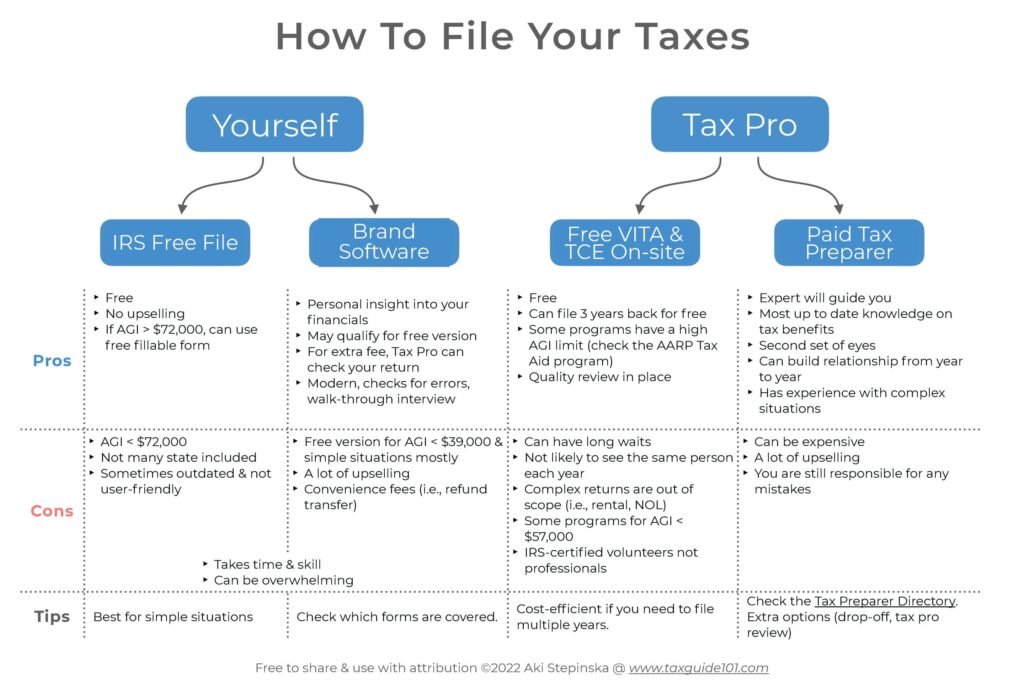
Filing your taxes. For many, the phrase alone can induce a sense of dread, conjuring images of complex forms, confusing jargon, and the looming fear of making a costly mistake. But what if we told you that for millions of Americans, the process can be simple, secure, and completely free?
For over two decades, the Internal Revenue Service (IRS) has partnered with leading tax software companies to offer qualified taxpayers a no-cost option for filing their federal returns. This initiative, known as the Free File Program, is a powerful tool that remains surprisingly underutilized. Beyond this program, there are other official, free methods available, depending on your income and comfort level.
This guide is your definitive resource for navigating the landscape of free online tax filing. We will demystify the programs, provide clear, step-by-step instructions, and empower you to file your taxes with confidence, ensuring you keep every penny of your hard-earned refund without paying unnecessary fees.
Why Trust This Guide? Our Commitment to EEAT
Before we dive in, it’s important to establish why this information is reliable.
- Expertise & Authoritativeness: This guide is built upon the foundation of official IRS resources, including irs.gov, IRS publications, and direct information from the Free File Alliance. We have meticulously researched the 2024 tax season requirements (for filing 2023 tax returns) to provide accurate, up-to-date information. The processes and recommendations outlined here are directly aligned with IRS-sanctioned methods.
- Experience: The steps and tips provided are distilled from years of practical experience navigating the U.S. tax system and using these free filing platforms. We understand the common pain points and questions that arise and have designed this guide to preemptively address them.
- Trustworthiness: Our goal is purely educational. We have no financial affiliation with any tax software company. We aim to provide unbiased information to help you make the best decision for your financial situation. All links and recommendations point to official, secure government or partner sites to ensure your safety and privacy.
Understanding Your Free Filing Options: A Breakdown
Not all free tax filing is created equal. It’s crucial to understand the different programs to choose the right one for you. The landscape primarily consists of two IRS-driven initiatives and one self-guided option.
1. The IRS Free File Program
This is the cornerstone of free tax filing for most Americans. It’s a public-private partnership between the IRS and a group of leading tax preparation software companies, known as the Free File Alliance.
How it Works: Each company sets its own eligibility criteria, which is almost always based on your Adjusted Gross Income (AGI). For the 2024 tax season (filing your 2023 taxes), the general rule is that if your AGI is $79,000 or less, you will find at least one, and likely several, software providers that will prepare and file your federal return for free. Some providers also offer free state return filing.
Key Features:
- Guided Preparation: You answer simple questions in an interview format, and the software fills in the appropriate forms for you.
- Full Functionality: It handles common tax situations like W-2 income, the Earned Income Tax Credit (EITC), Child Tax Credit, student loan interest deductions, and more.
- Maximum Refund Guarantee: Most providers guarantee they will find every credit and deduction you’re eligible for.
- Accuracy & Audit Support: The software performs calculations and checks for errors. Many also offer some level of audit guidance.
2. IRS Free File Fillable Forms
This is the other side of the IRS Free File Program, designed for taxpayers of all income levels.
How it Works: If your AGI is greater than $79,000, or if you simply prefer to do everything yourself, you can use the Free File Fillable Forms. This is essentially the digital version of a paper form. You must know which forms you need (e.g., 1040, Schedule A, Schedule B) and fill them out yourself.
Key Features:
- For All Incomes: No income restrictions.
- Basic Electronic Filing: It provides the “fill-in-the-blank” forms and performs basic math calculations.
- No Guidance: This is a critical point. Free File Fillable Forms does not offer interview-based guidance, help you find deductions, or check your return for errors. It is best suited for taxpayers who are already familiar with the tax code and comfortable preparing their own returns.
3. IRS Direct File (A New Pilot Program for 2024)
For the 2024 tax season, the IRS launched a limited pilot of a new program: Direct File.
How it Works: This is a program built and run directly by the IRS, allowing eligible taxpayers to file their federal tax return directly to the IRS without any commercial software acting as an intermediary.
Important Note on Eligibility (2024 Pilot): This was a very limited pilot. For the 2024 season, it was only available to residents of 12 participating states (AZ, CA, FL, MA, NV, NH, NY, SD, TN, TX, WA, WY) and only for taxpayers with very specific types of income (primarily W-2 wages), credits (like the Child Tax Credit), and deductions (like the standard deduction). It did not handle itemized deductions, gig economy income, or complex investment income.
The Future of Direct File: The IRS is evaluating the pilot to decide whether to expand the program in future years. For the 2024 filing season, the primary free options for most people remain the traditional Free File Program and Free File Fillable Forms.
Read more: How to Build Your Credit Score from Scratch Using Free Online Tools
A Step-by-Step Guide to Using the IRS Free File Program
This is the recommended path for the vast majority of taxpayers with an AGI under $79,000. Follow these steps for a smooth and free filing experience.
Step 1: Prepare Your Documents
Gathering your documents before you start is the single most important step to avoid frustration. Here’s a checklist:
Personal Information:
- Social Security Numbers (SSNs) for yourself, your spouse, and any dependents.
- Date of Birth for all individuals listed on the return.
- Your Prior Year’s Adjusted Gross Income (AGI) or your Self-Select PIN to electronically sign your return.
Income Documents:
- W-2s from all employers.
- 1099s for various types of income:
- 1099-NEC: Non-employee compensation (freelance, gig work).
- 1099-MISC: Miscellaneous income.
- 1099-INT: Interest earned.
- 1099-DIV: Dividends earned.
- 1099-B: Brokerage transactions.
- 1099-R: Retirement plan distributions.
- 1099-G: State tax refunds or unemployment compensation.
- Records of other income: Rental income, gambling winnings, etc.
Deduction and Credit Documents:
- 1098: Mortgage interest statement.
- 1098-E: Student loan interest paid.
- 1098-T: Tuition statement for education credits.
- Receipts for charitable contributions.
- Records of medical expenses, if significant.
- Records of state and local taxes paid (SALT).
- Childcare expenses with provider’s tax ID number.
- Health Insurance Form 1095-A, B, or C.
Step 2: Find the Right Free File Provider
Do not simply Google “free tax software.” Go directly to the source to ensure you get the legit, IRS-approved free version and not a paid upsell.
- Navigate to the IRS Free File Landing Page:
- Use the “IRS Free File Online Lookup” tool. This tool will ask you a few questions, including your age, state of residence, and estimated AGI.
- The tool will then display a list of providers for which you are eligible. You can see each provider’s specific offer, including whether they offer a free state return.
Pro Tip: Compare a few providers. Some may have a slightly higher AGI limit, while others may offer free state filing. Look for one that best matches your situation.
Step 3: Create an Account and Start Your Return
Once you’ve chosen a provider (e.g., TaxSlayer, TaxAct, FreeTaxUSA), you will be directed to their Free File site.
- Create a New Account: You will need to provide an email address and create a strong, unique password. Enable two-factor authentication if available for added security.
- Follow the Interview: The software will guide you through a series of questions about your life, income, and expenses. Answer them honestly and completely. The engine behind the scenes is determining which forms and schedules you need.
- Enter Your Data Carefully: Refer to your document checklist and input the numbers exactly as they appear on your W-2s and 1099s. Double-check each entry for typos.
Step 4: Navigate Common Tax Situations
The software is designed to handle these, but it helps to be prepared.
- Claiming the Earned Income Tax Credit (EITC): This is a significant credit for low-to-moderate-income workers. The software will ask detailed questions to determine your eligibility. Due to its value, returns claiming the EITC cannot be refunded before mid-February, as the IRS is required by law to hold them for additional verification.
- Student Loan Interest: You can deduct up to $2,500 of the interest you paid. Have your 1098-E ready.
- Child Tax Credit: You will need to provide the SSN and date of birth for each qualifying child.
- Health Insurance: The software will ask about your health insurance coverage for the year. For most, simply checking the box that they had coverage all year is sufficient.
Step 5: Review, Sign, and File
This is your last chance to catch errors.
- The Final Review: The software will present a summary of your return. Go through it line by line. Compare the final numbers to your source documents.
- Understand Your Results: Look at your “Tax Refund” or “Amount You Owe.” Does it make sense based on your withholdings? If it seems drastically off, go back and double-check your entries.
- Electronic Signature: To file, you must sign your return electronically. You can do this by providing your Prior Year AGI or your Self-Select PIN. This is a security measure to prevent fraud.
- Choose Your Filing Method:
- File Electronically: This is the fastest and most secure option. The IRS typically acknowledges receipt within 24 hours.
- Print and Mail: Not recommended unless absolutely necessary, as it slows down processing and increases the chance of human error.
Step 6: Decide on Your State Return
- Check Your Offer: Your Free File provider will clearly state whether state return preparation and filing is also free. Many offer it for free, but some may charge a fee.
- Consider Your Options: If your provider charges for state filing, you have a choice:
- Pay the fee (usually around $30-$40).
- Use your completed federal return as a guide and file your state return directly through your state’s department of revenue website. Many states have their own free filing systems.
Step 7: What to Do After You File
- Save a Copy: Download and save a PDF copy of your completed tax return and all supporting documents. You should keep these records for a minimum of three years.
- Track Your Refund: Use the IRS “Where’s My Refund?” tool on IRS.gov or the IRS2Go app. You’ll need your SSN, filing status, and the exact refund amount.
- Plan for Next Year: If you ended up owing a significant amount, consider adjusting your W-4 with your employer to have more tax withheld.
A Step-by-Step Guide to Using IRS Free File Fillable Forms
This method is for those who are ineligible for the guided Free File Program or who are tax-savvy.
- Go to the IRS Free File Page and click on “Free File Fillable Forms.”
- Create an Account. You will need an email and to create a secure password.
- Select Your Forms. You must know which tax forms you need to complete. Start with the Form 1040. The system will offer “suggested forms” based on some initial questions, but the onus is on you to add all necessary schedules (e.g., Schedule 1, Schedule A, Schedule B, Schedule D).
- Enter Your Data Manually. You will be typing numbers directly into the digital forms. The system will perform basic math calculations for you.
- Review Thoroughly. There is no error-checking engine. You must review every line for accuracy and completeness.
- Transmit Your Return. Once you are satisfied, you can electronically sign and file your return.
Warning: This method is best described as “digital paper.” It provides no guidance, no deduction-finding help, and no error-checking beyond basic math. If you are unsure about which forms to use or how to report an item, this is not the method for you.
How to Avoid Scams and “Free” That Isn’t Really Free
The term “free” is often used deceptively in the tax industry. Here’s how to stay safe.
- Stick to the IRS.gov Portal: The only way to guarantee you get an IRS Free File offer is to start at IRS.gov. Commercial software sites often have “free” editions that are only for very simple returns and then charge you to upgrade once you need to report a 1099, student loan interest, or even claim the EITC. This is known as a “bait-and-switch.”
- Read the Fine Print: Before you start, the Free File provider must clearly display their eligibility criteria and what is included for free. Read it.
- Beware of Hidden Fees: The most common fee is for state tax return filing. Be aware of this cost upfront.
- The IRS Will Never: Contact you by email, text, or social media to request personal or financial information. Demand immediate payment using specific methods like gift cards or cryptocurrency. Threaten to have you arrested immediately.
Read more: How to Start a Profitable Side Hustle on Etsy: A Step-by-Step Guide for Americans
Frequently Asked Questions (FAQ)
Q1: Is it really completely free? I won’t be charged at the end?
Yes, if you use an IRS Free File provider that you accessed through the IRS.gov website and you meet their eligibility criteria (like the AGI limit), the preparation and e-filing of your federal return will be completely free. Always confirm that state filing is also free before you start, as that is a common area where fees can apply.
Q2: What is my Adjusted Gross Income (AGI), and how do I find it?
Your AGI is your gross income (wages, dividends, capital gains, business income, etc.) minus specific deductions, known as “above-the-line” deductions (like student loan interest or traditional IRA contributions). It’s a key number used in many tax calculations. The easiest way to find your prior year’s AGI is on your Form 1040 from last year’s tax return, specifically on Line 11 of the 2022 Form 1040.
Q3: I’m a gig worker (DoorDash, Uber, freelancer). Can I file for free?
Yes, absolutely. This is a common misconception. Many IRS Free File providers can handle self-employment income reported on Form 1099-NEC. The software will guide you through reporting your income and business expenses, which will generate a Schedule C. Your eligibility is still based on your total AGI, which includes your gig income minus your expenses.
Q4: What if I make a mistake on my return after I’ve already filed it?
Don’t panic. The IRS has a process for this. You cannot simply re-file. You must file an amended return using Form 1040-X. You can now file Form 1040-X electronically for most situations through many tax software providers, though this typically carries a fee. You can also prepare and mail in a paper 1040-X for free. Amended returns can take significantly longer to process (up to 16 weeks).
Q5: The tax deadline is approaching, and I’m not ready to file. What should I do?
If you need more time to prepare your return, you can file for an automatic extension. This gives you until October 15 to file your return. Important: This is an extension to file, not an extension to pay. You must estimate and pay any tax you owe by the original April deadline to avoid penalties and interest. You can request an extension for free through the IRS Free File system or by making a payment directly to the IRS.
Q6: Is my financial and personal data safe with these companies?
The companies in the Free File Alliance are established, reputable tax preparation firms that use encryption and security measures to protect your data. They are bound by the IRS’s security and privacy requirements. Always ensure you are on the official website (look for “https://” and a lock icon in your browser’s address bar) and that you accessed it via the IRS.gov portal.
Q7: I only have a simple return—just a W-2. Is there a fastest free option?
If your return is very simple (often called “simple return” or “1040-EZ” type), almost any Free File provider will be very fast, perhaps taking less than 30 minutes. The process is streamlined for your situation. The speed is more about your preparation and internet connection than the provider itself.
Q8: What if I can’t afford to pay the tax I owe?
The worst thing you can do is not file because you can’t pay. The penalty for filing late is much larger than the penalty for paying late. File your return on time, even if you can’t pay the full amount. Then, contact the IRS immediately to set up a payment plan (installment agreement). You can often apply for a payment plan online through the IRS website.
Conclusion: You Have the Power to File for Free
Filing your taxes is a civic duty, but it doesn’t have to be a financial burden. The IRS Free File Program is a powerful, legitimate, and underutilized resource designed to make the process accessible and cost-effective for the majority of Americans. By taking control, using the official IRS gateway, and following the steps outlined in this guide, you can confidently navigate tax season, secure your maximum refund, and achieve peace of mind—all without spending a single dollar on preparation fees.
Empower yourself this tax season. Start at IRS.gov/freefile, and claim the free filing service you deserve.