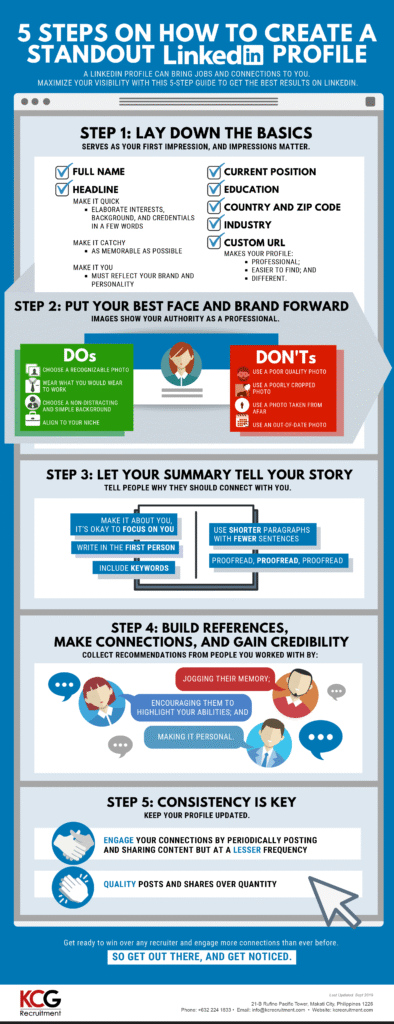
In today’s hyper-competitive American job market, your resume is no longer enough. For millions of professionals, from recent graduates to seasoned executives, the digital gateway to career opportunities is LinkedIn. With over 100 million users in the United States alone, LinkedIn is the undisputed hub for recruiters, who use it as their primary tool to source, vet, and connect with potential candidates.
But having a LinkedIn profile is not the same as having a standout LinkedIn profile. The difference between a passive, incomplete page and an optimized, dynamic professional presence is the difference between being overlooked and being actively recruited for your dream job.
This guide is your masterclass in transforming your LinkedIn profile from a digital footnote into a powerful career asset. We will delve beyond the basics, providing a step-by-step blueprint for crafting a profile that not only showcases your experience but also demonstrates your expertise, builds authority in your field, and establishes trust with both recruiters and your network. Furthermore, we will equip you with proactive strategies to ensure you are not just waiting for opportunities, but actively attracting them.
Part 1: The Foundation of a Standout LinkedIn Profile
Before we dive into the nuances, it’s crucial to understand that your LinkedIn profile is not your resume. It is a dynamic, multi-media, conversational representation of your professional brand. It’s your story, told your way.
1. The Profile Picture: Your Digital Handshake
Your profile picture is the first thing people see. In a platform built on connections, a poor photo can be a deal-breaker.
- Professional Quality is Non-Negotiable: This doesn’t mean you need a studio photoshoot, but it does mean good lighting, a neutral background, and a sharp, high-resolution image.
- You, and Only You: The frame should be from the shoulders up, with your face taking up about 60% of the space. Avoid group photos, distracting backgrounds, or logos.
- Dress the Part: Wear what you would wear to a key meeting or interview in your industry. When in doubt, business casual is a safe bet.
- Be Approachable: Smile with your eyes. A genuine, confident expression makes you look both competent and likable.
2. The Background Photo: Your Free Billboard
Directly behind your profile picture is a large, horizontal banner image. Do not leave this as the default blue background. This is valuable visual real estate to reinforce your personal brand.
- Options include:
- A branded graphic with your core value proposition or tagline.
- A high-quality image related to your industry (e.g., a software developer might use a clean, abstract tech image).
- A picture of you speaking at an event or working in your element (ensure it’s professional).
- Free tools like Canva have pre-sized LinkedIn banner templates.
3. The Headline: Your 120-Character Value Proposition
This is arguably the most important real estate on your profile after your name. The default headline is your current job title. This is a missed opportunity. Your headline should be a keyword-rich, compelling statement that tells people what you do and why it matters.
Formula for a Powerful Headline:
[Your Key Title/Role] | [Your Core Expertise] | [The Value You Deliver or Your Unique Differentiator]
- Bad Headline: Marketing Manager at ABC Corp
- Good Headline: Senior Marketing Manager | B2B SaaS Growth Strategist | Driving Revenue Through Data-Driven Campaigns & Content
Incorporate keywords that recruiters in your field would search for, such as “Product Management,” “FP&A,” “DevOps Engineering,” or “Talent Acquisition.”
4. The “Open to Work” Feature: Signaling Your Intent
LinkedIn offers a powerful, yet sometimes debated, feature: the “Open to Work” frame. For those actively seeking a new role, it is an invaluable tool.
- How to Use It: You can choose to display the #OpenToWork green frame on your profile picture for all to see, or you can signal only to recruiters. The latter is often the preferred method as it maintains discretion with your current network while alerting the recruiter ecosystem.
- Be Specific: When you set this up, you can specify the types of roles you’re seeking (job titles, location, remote/hybrid/on-site, industry), making it exponentially easier for recruiters to match you with relevant opportunities.
Part 2: Crafting a Compelling Narrative in the Core Sections
Now we move to the heart of your profile, where you build the narrative of your professional journey and expertise.
1. The “About” Section: Your Professional Story
This is not the “Objective” section from a 1990s resume. Think of it as your elevator pitch in written form. It should be a compelling, first-person narrative that connects the dots of your career.
Structure Your “About” Section for Maximum Impact:
- Hook (First 2-3 Lines): Summarize your core identity and value. Because the section is truncated (with a “See more” link), your opening must grab attention.
- Example: “Data-driven Product Leader with 10+ years of experience scaling B2C mobile applications that engage millions of users. Passionate about bridging the gap between user needs, business strategy, and agile engineering teams.”
- Core Paragraphs: Elaborate on your key skills, areas of expertise, and professional philosophy. Use bullet points or short paragraphs for readability. Weave in your most impressive achievements and quantify them.
- Specialties/Keywords: Conclude with a section listing your core competencies. This is a goldmine for search engine optimization (SEO) within LinkedIn. Use a cloud of relevant skills and technologies (e.g., “Python, SQL, Tableau, AWS, Scrum, Financial Modeling, M&A, Talent Development”).
2. The “Featured” Section: Your Proof Portfolio
Located near the top of your profile, this section allows you to pin links, documents, images, and posts. It’s the perfect place to showcase tangible proof of your work and expertise.
What to Feature:
- Links to your portfolio website (for designers, writers, developers).
- PDFs of case studies or project summaries (anonymized if necessary).
- SlideShare presentations from talks you’ve given.
- Articles you’ve published on LinkedIn or other platforms.
- A video of you presenting or explaining a complex topic.
3. The “Experience” Section: Beyond Responsibilities to Impact
This is where you detail your work history, but the key is to move beyond a simple list of job duties. Recruiters want to see impact.
Use the STAR Method (Situation, Task, Action, Result) to Frame Your Bullet Points:
- Instead of: “Responsible for managing the social media budget.”
- Write: “Managed a $500k annual social media ad budget (Situation/Task). Implemented a new A/B testing framework and re-allocated spend based on performance data (Action). Resulted in a 40% reduction in cost-per-lead and a 15% increase in qualified marketing conversions in 6 months (Result).”
Quantify Everything Possible: Use numbers, percentages, and dollar amounts. Did you increase efficiency by 25%? Grow revenue by $1M? Manage a team of 12? Reduce costs by 15%? Numbers create credibility and scale.
4. The “Skills & Endorsements” Section: Social Proof of Your Abilities
This section is critical for LinkedIn’s search algorithm. Recruiters frequently filter searches by skills.
- Curate Your Skills: List a robust set of 15-20 relevant skills. Mix hard skills (e.g., “Financial Analysis,” “Java,” “UX Research”) with soft skills (e.g., “Leadership,” “Public Speaking,” “Strategic Planning”).
- Prioritize Your Top 3: You can feature three skills at the top of the section. Choose the ones most critical to the roles you are targeting.
- The Power of Endorsements: While not as weighty as recommendations, endorsements provide social proof. A simple way to get more is to give more—endorse the skills of your connections thoughtfully.
5. The “Recommendations” Section: The Ultimate Trust Builder
Recommendations are the LinkedIn equivalent of professional testimonials. A strong, detailed recommendation from a former manager, colleague, or client is incredibly powerful.
- How to Get Great Recommendations:
- Be Specific: Don’t just send a generic request. Write a personalized message. Remind the person of a specific project you worked on together and suggest a strength you’d like them to highlight if they feel comfortable.
- Offer to Reciprocate: “I’d be happy to write one for you as well.”
- Make it Easy: Provide them with a bullet point or two about the project to jog their memory.
6. Education, Licenses, and Certifications: Completing the Picture
Fill these out completely. For certifications, especially in fields like project management (PMP), IT (AWS, Cisco), finance (CFA), or HR (SHRM-CP), this is non-negotiable. It’s a quick and easy way for recruiters to verify your qualifications.
Read more: How To Create a Successful YouTube Channel
Part 3: The Proactive Approach: Getting Recruited
A perfect profile is useless if it’s invisible. Now, let’s shift from a passive to an active strategy.
1. Optimize Your Profile for Recruiter Searches
Recruiters use LinkedIn Recruiter, a powerful platform with advanced boolean search capabilities. Your goal is to appear at the top of their search results.
- Keyword Optimization: Weave relevant job titles, skills, and industry terminology throughout your profile—especially in the Headline, About, and Experience sections. Think like a recruiter: what words would they type to find someone like you?
- Completeness is Key: LinkedIn’s algorithm favors “All-Star” level profiles. Ensure every section is filled out to 100% completion.
2. Build and Engage Your Network Strategically
Your network is your net worth on LinkedIn.
- Connect with Intent: When you send a connection request, always personalize the message. “Hi [Name], I saw your post on [topic] and found it insightful. I’m also in the [industry] space and would value connecting.” This dramatically increases acceptance rates.
- Grow Your Network Methodically: Connect with colleagues (past and present), alumni from your university, and people you meet at industry events. A network of 500+ connections is generally seen as a baseline for being well-connected.
3. Become a Content Creator and Engager
This is the single most effective way to build authority and get on the radar of recruiters without directly applying for jobs.
- Share Your Expertise: You don’t have to write long articles every day. Start by sharing interesting industry news with your own brief commentary. Ask a question to spark conversation.
- Create Original Content: Write articles or create posts about lessons you’ve learned, challenges you’ve overcome, or trends you’re observing. This positions you as a thoughtful leader in your field.
- Engage with Others’ Content: Comment meaningfully on posts by influencers, companies you admire, and recruiters in your industry. Add value to the conversation; don’t just say “Great post!” This puts your name and profile in front of a wider, relevant audience.
4. Engage with Recruiters the Right Way
- Respond Promptly: If a recruiter messages you, respond in a timely manner, even if you’re not interested. The market is small, and professionalism matters.
- Be Clear and Gracious: If you’re not interested, a simple “Thank you for reaching out. This isn’t quite the right fit for me at the moment, but I wish you the best in your search,” maintains a positive relationship.
- If You Are Interested: Be proactive. Express your interest, ask for the next steps, and suggest a time to talk.
5. Leverage the Jobs Tab and Company Research
- Set Up Job Alerts: Use LinkedIn Jobs to create saved searches with your target titles, locations, and other filters. You’ll get daily or weekly email alerts.
- Research Companies: Follow companies you’re interested in. This not only keeps you informed about their news but also signals your interest. You can often see who you know at the company and get a referral.
- The Power of the Referral: In the US job market, a referral is the single best way to get your foot in the door. Use your LinkedIn network to see if you have a 1st or 2nd-degree connection at your target company and ask for a referral or an informational interview.
Part 4: Advanced Strategies for the US Market
- Customize Your URL: Edit your public profile URL to be a clean version of your name (e.g.,
linkedin.com/in/yourname). This looks professional on your resume and email signature. - Utilize the “Creator Mode”: If you plan to create content regularly, turn on Creator Mode. This puts a “Follow” button on your profile and gives you access to advanced analytics and a larger newsletter platform.
- Understand US Cultural Nuances: US recruiters and hiring managers typically respond well to confident, quantified achievements. Don’t be overly humble. Clearly and proudly state your accomplishments and the value you bring.
Conclusion: Your Profile is a Living Document
Creating a standout LinkedIn profile is not a one-time task. It’s a living document that should evolve as you do. Revisit it quarterly. Update it with new skills, projects, and accomplishments. Consistently engage with your network and share your knowledge.
By following this comprehensive guide, you are doing more than just filling out an online form. You are strategically crafting a professional brand that demonstrates Experience through your detailed work history, Expertise through your content and recommendations, Authoritativeness through your engagement and thought leadership, and Trustworthiness through the social proof of your network and endorsements.
This holistic approach will transform your LinkedIn profile from a static digital CV into a dynamic career hub, making you not just findable, but irresistible to top US recruiters.
Read more: How To Start an Online Store Using Shopify
Frequently Asked Questions (FAQ)
Q1: I’m not actively job searching. Should I still optimize my LinkedIn profile?
A: Absolutely. A well-maintained LinkedIn profile serves as your professional digital footprint. It can lead to unexpected opportunities like speaking engagements, collaboration requests, partnership inquiries, and recruiter outreach for roles you might not have known about but can’t refuse. Think of it as career insurance.
Q2: How often should I post on LinkedIn to build authority?
A: Consistency is more important than frequency. For most professionals, posting 2-3 times per week is a sustainable and effective rhythm. Focus on quality over quantity. One insightful post per week is better than seven low-effort shares.
Q3: Is the “Open to Work” banner seen as desperate?
A: This is a common concern, but in today’s market, it’s widely accepted as a smart, efficient tool. The discreet version (“Signal to recruiters only”) is recommended if you are concerned about your current employer seeing it. It’s a clear signal that saves everyone time.
Q4: Should I connect with people I don’t know?
A: Yes, but with strategy and personalization. Blindly connecting with thousands of strangers dilutes your network’s value. Instead, connect with people in your industry, at companies you admire, or who share professional interests. Always send a personalized note explaining why you want to connect.
Q5: What’s the biggest mistake people make on their LinkedIn profiles?
A: The single biggest mistake is inconsistency and passivity. An incomplete profile with an unprofessional photo, a default headline, and sparse experience sections signals a lack of attention to detail and a disengaged professional. The second biggest mistake is treating the “Experience” section as a list of duties instead of a list of quantified achievements.
Q6: How can I handle a career change on my LinkedIn profile?
A: This requires a focus on transferable skills and narrative. Your “About” section is crucial here. Craft a story that connects your past experience to your future goals. Highlight skills that are relevant across industries (e.g., project management, data analysis, leadership, communication). Use the “Featured” section to showcase projects or certifications that align with your new target field. Network strategically with people in your desired industry.
Q7: Are LinkedIn Premium subscriptions worth it for job seekers?
A: For an active job seeker, LinkedIn Premium (specifically the “Career” tier) can be very worthwhile. Benefits include:
- Seeing who has viewed your profile (which can be recruiters).
- Access to LinkedIn Learning courses to brush up on skills.
- InMail messages to contact recruiters and hiring managers directly.
- Enhanced insights into how you compare to other applicants for a job.
- Consider a one-month subscription during a peak job search to leverage these tools.
Q8: What should I do if I get no response from a recruiter after applying?
A: Don’t take it personally. Recruiters are often inundated. If you can find the recruiter or hiring manager for the role on LinkedIn, you can send a polite, brief InMail or connection request. Reference the role, reiterate your enthusiasm, and highlight one key qualification that makes you a great fit. This extra step can make your application stand out from the hundreds of others.