Hiring your first employee is a monumental milestone for any business. It signifies growth, potential, and the exciting transition from a solo venture to a team. However, this milestone comes with a formidable new responsibility: managing US payroll and taxes. The labyrinth of federal, state, and local regulations can be daunting, and missteps can lead to costly penalties, disgruntled employees, and significant legal headaches.
This guide is designed to be your definitive roadmap. We will demystify the entire process, providing a step-by-step checklist and deep-dive explanations to ensure you build a compliant, efficient, and scalable payroll system from the ground up. By adhering to the principles of Experience, Expertise, Authoritativeness, and Trustworthiness (EEAT), this article draws on established practices and clear guidelines to empower you with the knowledge you need to succeed.
Part 1: Laying the Groundwork – Before You Hire
Preparation is everything. Taking these critical steps before your first employee’s start date will prevent a frantic, error-prone onboarding process.
Step 1: Obtain an Employer Identification Number (EIN)
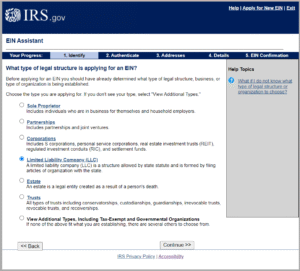
Think of an EIN as a Social Security Number for your business. It’s a unique nine-digit number assigned by the Internal Revenue Service (IRS) to identify your business entity for tax purposes.
- Why it’s crucial: You cannot report taxes or hire employees without an EIN. It’s required for everything from opening a business bank account to filing tax returns.
- How to get one: The process is free and can be completed online on the IRS website. You will receive your EIN immediately upon verification.
Step 2: Set Up Your Payroll System and Schedule
Decide how and when you will pay your employees. Consistency is key here.
- Payroll System Options:
- DIY with Spreadsheets: High risk and not recommended. Prone to human error and difficult to manage as you grow.
- Payroll Software: (e.g., Gusto, QuickBooks Payroll, ADP Run). The recommended choice for most small businesses. Automates calculations, tax filings, and payments.
- Outsourcing to a PEO/Accountant: A full-service option where a Professional Employer Organization (PEO) or CPA firm handles everything for you. Higher cost, but hands-off.
- Pay Frequency: You must choose a pay period. Common schedules are:
- Weekly (52 pay periods/year)
- Bi-weekly (26 pay periods/year)
- Semi-monthly (24 pay periods/year)
- Monthly (12 pay periods/year)
- Check State Laws: Your state may have laws mandating a minimum pay frequency (e.g., California generally requires semi-monthly pay for most employees).
Step 3: Understand Worker Classification: Employee vs. Independent Contractor
This is one of the most critical and frequently audited areas. Misclassifying an employee as an independent contractor can result in massive back-tax liabilities, penalties, and legal action.
- Employee: You control what, when, where, and how the work is done. You provide tools and training. You are subject to withholding income taxes, Social Security, Medicare, and unemployment taxes.
- Independent Contractor: Has more control over how they perform the work, uses their own tools, and often works for multiple clients. You do not withhold taxes; you simply issue a Form 1099-NEC at year-end if you pay them $600 or more.
- The Tests: The IRS uses a “Common Law Test” focusing on behavioral control, financial control, and the relationship of the parties. When in doubt, use the IRS Form SS-8 to request a formal determination.
Step 4: Complete Required New Hire Paperwork
On or before the first day, your new employee must complete several federal forms.
- Form W-4, Employee’s Withholding Certificate: This form determines how much federal income tax to withhold from their paycheck. The current version (post-2020) is significantly different from previous ones, using a five-step process instead of allowances.
- Form I-9, Employment Eligibility Verification: You must verify the identity and employment authorization of every new hire in the United States. The employee completes Section 1 on their first day, and you, the employer, must physically examine their original documents (e.g., passport, driver’s license, Social Security card) and complete Section 2 within three business days of their start date. Keep this form on file; do not send it to the government unless requested.
Step 5: Register with State Agencies
You need to be on the radar of your state’s tax and labor departments.
- State Income Tax Withholding: Register with your state’s Department of Revenue (or equivalent) to withhold state income taxes.
- State Unemployment Insurance (SUI or SUTA): Register with your state’s unemployment agency. You will be assigned a SUI tax rate, which is used to fund unemployment benefits for workers who lose their jobs.
- New Hire Reporting: All states require employers to report newly hired and re-hired employees to a state directory, typically within 20 days of their start date. This information is used to enforce child support orders.
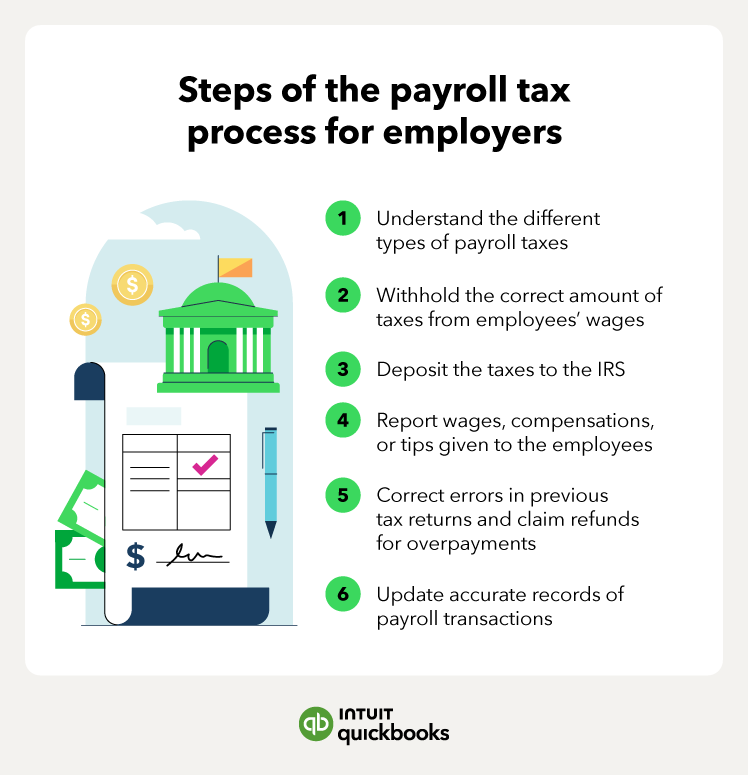
Part 2: The Payroll Cycle – A Step-by-Step Process
Once your foundation is set, you’ll enter the recurring payroll cycle. Here’s what to do every pay period.
Step 1: Track Time and Attendance
For non-exempt employees (those eligible for overtime), you are legally required to track hours worked. This includes regular hours and any overtime (typically hours worked over 40 in a workweek, at a rate of 1.5x their regular pay).
- Methods: Use a digital time clock, a dedicated app, or even a simple timesheet, but ensure it’s accurate and signed by the employee.
Step 2: Calculate Gross Pay
Gross pay is the total compensation earned before any deductions.
- Hourly Employees: (Total Hours Worked x Hourly Rate) + (Overtime Hours x Overtime Rate)
- Salaried Employees: (Annual Salary / Number of Pay Periods in a Year)
Step 3: Calculate and Withhold Deductions
This is where it gets complex. Deductions fall into two categories: pre-tax and post-tax.
- Pre-Tax Deductions: Taken out before taxes are applied, lowering the employee’s taxable income. This benefits the employee.
- 401(k) or other retirement plan contributions
- Health Insurance Premiums
- Flexible Spending Account (FSA) or Health Savings Account (HSA) contributions
- Mandatory Withholdings (Post-Tax Calculation):
- Federal Income Tax: Based on the employee’s Form W-4, their gross pay, and IRS withholding tables.
- Social Security Tax: 6.2% of gross pay, up to the annual wage base limit ($168,600 for 2024).
- Medicare Tax: 1.45% of gross pay, with no wage base limit. High earners are subject to an Additional Medicare Tax of 0.9% on earnings over a threshold ($200,000 for single filers), which is only withheld from the employee.
- State and Local Income Taxes: Withheld according to state and local laws and the employee’s state W-4 equivalent.
Step 4: Calculate Employer-Paid Taxes and Contributions
As an employer, you are not just a tax collector; you are a tax payer. You have your own share of payroll taxes to cover.
- Social Security Tax Match: You must pay 6.2% of the employee’s gross pay, matching their contribution.
- Medicare Tax Match: You must pay 1.45% of the employee’s gross pay, matching their contribution.
- Federal Unemployment Tax (FUTA): This is 6.0% on the first $7,000 of each employee’s wages. However, you typically receive a credit of up to 5.4% for paying state unemployment taxes (SUTA), making the effective FUTA rate 0.6%.
- State Unemployment Tax (SUTA): The rate is assigned by your state and varies based on your industry and experience with layoffs (your “experience rating”).
- Other State-Specific Taxes: Some states have additional employer-paid taxes for disability insurance, family leave, etc.
Step 5: Process Net Pay and Pay Employees
Net pay is the final amount the employee takes home: Gross Pay – All Deductions = Net Pay.
- Payment Methods: Direct deposit is the standard, but you can also use paper checks or pay cards, subject to state regulations.
Step 6: Maintain Impeccable Records
Keep detailed records for each pay period and each employee. This is non-negotiable for compliance and dispute resolution.
- What to Keep: Payroll registers, copies of pay stubs, timesheets, tax filings, and proof of tax payments.
- How Long: The Fair Labor Standards Act (FLSA) requires keeping payroll records for at least three years. It’s a best practice to keep them for at least four years to cover various state statutes of limitations.
Part 3: Ongoing Compliance and Reporting
Your responsibilities extend beyond the weekly or bi-weekly pay cycle.
Step 1: File Quarterly Payroll Tax Returns
You must report your payroll taxes to the IRS and state agencies every quarter, even if you have no tax liability for that period.
- Form 941, Employer’s Quarterly Federal Tax Return: Filed with the IRS to report federal income tax withheld, and both the employer and employee shares of Social Security and Medicare taxes.
- State Quarterly Wage and Tax Returns: Filed with your state to report state income tax withheld and state unemployment taxes.
Step 2: Make Tax Deposits
You can’t just hold the taxes you’ve withheld; you must deposit them with the IRS according to a strict schedule.
- Deposit Schedule: Your schedule is determined by the total tax liability you reported in a lookback period. It’s either monthly or semi-weekly. New employers typically start on a monthly schedule.
- Monthly Depositor: Deposit taxes by the 15th of the following month.
- Semi-Weekly Depositor: Deposit taxes on Wednesdays or Fridays, depending on your payday.
- The Electronic Federal Tax Payment System (EFTPS): This is the mandatory system for all federal tax deposits. Register early.
Read more: The Ultimate Guide to Digital Marketing for US Small Businesses on a Budget
Step 3: Complete Annual Filings and Reporting
The year-end brings a final wrap-up of payroll data for both employees and the government.
- Form W-2, Wage and Tax Statement: You must provide a copy to each employee and the Social Security Administration (SSA) by January 31st of the following year. It summarizes the employee’s annual earnings and tax withholdings.
- Form W-3, Transmittal of Wage and Tax Statements: This is the cover sheet sent to the SSA when you submit all your W-2s.
- Form 940, Employer’s Annual Federal Unemployment (FUTA) Tax Return: This annual return reconciles your FUTA tax liability for the year. It’s due by January 31st.
- Form 1099-NEC: For any independent contractor you paid $600 or more during the year, you must provide them with this form by January 31st and file a copy with the IRS.
Part 4: Special Considerations and Best Practices
Multi-State Employment
If you have employees working in different states, you enter a new world of complexity. You may need to:
- Register as an employer in each state where your employees work.
- Withhold income taxes for the state of work (and sometimes the state of residence, if different).
- Pay SUTA to the state where the work is performed.
- Comply with the varying minimum wage, overtime, and paid leave laws of each state.
Benefits and Garnishments
- Benefits Administration: If you offer benefits like health insurance or a 401(k), you must ensure proper deductions and compliance with laws like ERISA and the ACA.
- Wage Garnishments: If you receive a court order (e.g., for child support, tax debt, or student loans), you are legally required to withhold a portion of the employee’s wages and send it to the appropriate agency. There are strict limits on the amount you can withhold.
Best Practices for Success
- Automate Early: Invest in a reputable payroll software. The cost is far less than the potential cost of a single error or penalty.
- Stay Informed: Tax laws and rates change annually. Subscribe to updates from the IRS (IRS.gov) and your state’s tax agency.
- Calendar Everything: Create a master payroll calendar with all deadlines for paydays, tax deposits, and quarterly/annual filings.
- Conduct a Payroll Audit: Once a year, do a self-audit to ensure your records match your bank statements and tax filings.
- Consult a Professional: When in doubt, seek help from a qualified CPA or HR consultant. Their expertise can save you from catastrophic mistakes.
Conclusion: Empowerment Through Diligence
Navigating US payroll and taxes is a significant undertaking, but it is not insurmountable. By methodically following this checklist, you transform a complex regulatory challenge into a structured, manageable process. The key is to be proactive, organized, and willing to leverage technology and professional expertise. By building a compliant payroll system from the start, you protect your business, foster trust with your employees, and lay a solid foundation for sustainable growth. Your focus can remain where it should be: on building your business and leading your team.
Read more: How to Get an EIN for Your New US Business (A Step-by-Step Guide)
Frequently Asked Questions (FAQ)
Q1: What is the single biggest mistake first-time employers make with payroll?
A: Misclassifying workers as independent contractors instead of employees is arguably the most common and costly error. The IRS and state agencies treat this very seriously, and the penalties for getting it wrong can include back taxes, interest, and fines that can cripple a small business. When in doubt, err on the side of classifying as an employee or seek professional guidance.
Q2: Can I just use a spreadsheet to manage my payroll?
A: While technically possible, it is highly discouraged. Manual calculations are extremely prone to errors in tax withholdings, overtime, and deductions. You are also solely responsible for staying up-to-date with changing tax rates and forms. Payroll software automates these complex calculations and filings, dramatically reducing the risk of costly mistakes and saving you countless hours.
Q3: How often do I need to pay my employees?
A: The frequency is determined by state law. While federal law doesn’t mandate a specific schedule, most states do. Common requirements are semi-monthly or bi-weekly. You must check the Department of Labor website for your specific state to determine the legal minimum pay frequency.
Q4: What is the difference between FUTA and SUTA?
A:
- FUTA (Federal Unemployment Tax Act) is a federal tax that funds state unemployment agencies and federal oversight. The effective rate for employers is typically 0.6% on the first $7,000 of each employee’s wages.
- SUTA (State Unemployment Tax Act), also known as SUI, is a state tax that funds the state’s unemployment insurance program for out-of-work residents. The rate varies by state and by employer, based on your industry and history of layoffs.
Q5: What happens if I file or pay my payroll taxes late?
A: The penalties can be severe and add up quickly. The IRS charges failure-to-file and failure-to-deposit penalties, which are a percentage of the unpaid tax. These penalties accrue interest over time. Consistent late filing can also lead to the IRS changing your deposit schedule to a more frequent one (e.g., moving you from monthly to semi-weekly).
Q6: Do I need to provide pay stubs to my employees?
A: Most states have laws requiring employers to provide a detailed pay stub (or statement of earnings) with each paycheck. Even if your state doesn’t require it, it is a best practice for transparency and record-keeping. The pay stub should list gross pay, all itemized deductions, and net pay.
Q7: I have an employee moving to another state to work remotely. What do I need to do?
A: This creates a multi-state employment situation. You will likely need to:
- Register as an employer in the new state.
- Withhold state income tax for the new state.
- Pay state unemployment insurance (SUTA) to the new state.
- Ensure compliance with the new state’s labor laws (minimum wage, overtime, meal breaks, etc.). You should consult with an HR or tax professional specializing in multi-state issues.
Q8: What is EFTPS and is it mandatory?
A: The Electronic Federal Tax Payment System is the free service provided by the U.S. Department of the Treasury used to pay federal taxes electronically. Yes, it is mandatory for all businesses to use EFTPS for their federal payroll tax deposits (e.g., those reported on Form 941).
Q9: When am I required to provide a 1099-NEC form?
A: You must provide a Form 1099-NEC to any independent contractor (or other non-employee service provider) whom you paid $600 or more for services during the calendar year. You must send the form to the contractor and file it with the IRS by January 31st of the following year.
Q10: Should I use a PEO? What are the benefits?
A: A Professional Employer Organization (PEO) is a company that provides comprehensive HR, payroll, benefits, and compliance services under a co-employment model. The benefits for a small business include:
- Access to enterprise-level health insurance and 401(k) plans.
- Offloading the entire burden of payroll processing and tax compliance.
- Expertise in multi-state and complex HR regulations.
The downside is the higher cost compared to using payroll software yourself. It’s an excellent option for businesses that want a completely hands-off approach and need to offer competitive benefits.