How To Build a Mobile App Without Coding: The 2024 Ultimate Guide
Article Summary (90-100 words): This guide details how to build a mobile app without writing code, making app development accessible to entrepreneurs, small businesses, and creators. We explore the top no-code app builders like Adalo, Bubble, and Glide, comparing their strengths for various project types—from social networks to business tools. The process is broken down into clear, actionable steps: from idea validation and UI design to integrating critical features like databases and payments. With real-world examples and expert insights, you’ll learn how to transform your idea into a functional, professional app, launch it on the App Store and Google Play, and grow your user base, all without technical expertise.
For years, the ability to create a mobile app felt like a superpower reserved for a select few—developers who could speak the cryptic languages of Swift, Kotlin, and Java. If you were an entrepreneur with a groundbreaking idea, a small business owner wanting to engage customers, or a creator building a community, the path was fraught with immense technical and financial barriers. Hiring an agency could cost anywhere from $50,000 to well over $250,000, not to mention the ongoing maintenance and update fees. This reality left countless brilliant ideas stuck on the whiteboard, forever out of reach.
But what if we told you the game has completely changed? The rise of no-code development has democratized app creation, turning it from a technical feat into a creative and strategic one. Today, you can build a sophisticated, fully-functional mobile app without writing a single line of code. These powerful visual development platforms have empowered a new generation of “citizen developers” to bring their visions to life, quickly, affordably, and with full creative control.
Consider the story of Mark and Sarah, two fitness coaches who wanted to create a custom app for their clients. They needed a place for workout plans, meal tracking, and client communication. With a budget of under $5,000 and zero coding knowledge, they used a no-code platform to build and launch their app in just six weeks. They now have thousands of active users and a thriving business that was built entirely by themselves. Their story is not unique; it’s a testament to the power of the tools now available.
In this definitive guide, we will walk you through every step of this exciting journey. We will demystify the process, introduce you to the leading no-code platforms, and provide a clear, actionable blueprint for turning your app idea into a reality. Whether you’re looking to build a product for your business, a tool for your community, or the next viral sensation, this guide is your starting point.
What is No-Code Development, Really?
At its core, no-code development is a method of building software applications using visual, drag-and-drop interfaces and configuration instead of traditional programming. Imagine building a website with WordPress or Wix—you pick a template, you drag in elements like text boxes and images, and you configure settings from a menu. No-code app builders apply this same intuitive principle to mobile and web application development.
These platforms provide you with a set of pre-built “components” or “elements”—screens, buttons, input fields, lists, maps, and more. You assemble these components like digital Lego blocks, define how they interact with each other through visual workflows (e.g., “When this button is clicked, navigate to that screen”), and connect them to external services like databases and payment gateways. The platform then automatically generates the clean, production-ready code in the background, packaging it into a native or cross-platform app ready for the stores.
Why the No-Code Movement is Exploding
The no-code revolution isn’t just a trend; it’s a fundamental shift in how we create digital products. The market is projected to grow to $50 billion by 2024, according to Forrester Research. This explosive growth is driven by several key factors:
- Bridging the Digital Skills Gap: There are far more great ideas than there are available developers. No-code empowers the people with the domain expertise (like our fitness coaches, Mark and Sarah) to build the solutions they need.
- Unprecedented Speed and Agility: You can go from an idea to a working prototype in hours, not months. This allows for rapid validation and iteration. You can test your app concept with real users before investing significant time and money.
- Dramatic Cost Reduction: Building an app traditionally is expensive. No-code platforms typically operate on a subscription model, ranging from $50 to $500 per month, slashing the upfront cost by over 90% in most cases.
- Total Creative Control: You are not dependent on a developer’s interpretation of your vision. You make the changes, you tweak the design, and you control the entire roadmap.
Top No-Code App Builders: Choosing Your Perfect Tool
The no-code ecosystem is rich with diverse platforms, each with its own strengths and ideal use cases. Your choice of tool will significantly impact your app’s capabilities, design flexibility, and scalability. Here, we break down the leading contenders.
1. Adalo: The King of Custom Mobile UI
Best For: Startups, entrepreneurs, and anyone who needs a truly custom-designed, native-feeling mobile app.
Adalo is often the go-to choice for building apps that look and feel like they were coded from scratch. It offers an incredible amount of design freedom, allowing you to place elements anywhere on the screen, create custom animations, and build complex interactions.
- Key Features: A powerful drag-and-drop editor, a built-in database, and the ability to easily connect to third-party services via APIs. Its “Magic Text” feature allows you to display dynamic data from your database anywhere in the app with simple curly brackets
{ }. - Ideal For: Marketplaces, social networks, on-demand service apps, and branded business apps.
- Publishing: Adalo handles the process of compiling your app for both the Apple App Store and Google Play Store, managing the complex certificates for you.
2. Bubble: The Powerhouse for Complex Web Apps
Best For: Data-heavy web applications, SaaS products, and complex marketplaces.
While Bubble is primarily for building web applications that can be used on a mobile browser, its power is unmatched. If your app idea relies heavily on complex workflows, user permissions, and large datasets, Bubble is your best bet. It’s visually programming the logic of your application.
- Key Features: A robust visual workflow editor, a powerful built-in database, and exceptional scalability. Bubble apps can handle millions of users and complex, multi-sided platforms.
- Ideal For: A custom CRM, a project management tool like Asana, a community platform, or a multi-vendor marketplace like Etsy.
- Real-World Example: Dividends, a finance app, was built on Bubble and grew to manage over $200 million in assets without a single line of code.
3. Glide: The Speed Demon for Data-Driven Apps
Best For: Quickly turning a Google Sheet into a beautiful, functional app for internal tools, event guides, or customer portals.
Glide is arguably the fastest way to build an app. If you can build a spreadsheet, you can build a Glide app. You connect your Google Sheets document, and Glide instantly transforms your rows and columns into lists, profiles, and detail screens.
- Key Features: Lightning-fast development, live-syncing with Google Sheets, and a wide array of pre-built templates.
- Ideal For: Employee directories, event schedules, inventory management systems, restaurant menus, and personal habit trackers.
- Publishing: Glide apps can be published as progressive web apps (PWAs) or submitted to the app stores.
4. Softr: The Front-End for Your Airtable Database
Best For: Building powerful client portals, membership sites, and internal tools on top of Airtable.
Softr is the perfect marriage between Airtable’s incredible flexibility as a database and a beautiful, user-facing front-end. It allows you to build authenticated experiences where users can log in and see only the data they’re permitted to see.
- Key Features: Strong user authentication and access control, a variety of building blocks, and seamless Airtable integration.
- Ideal For: Online course platforms, client dashboards, membership communities, and resource libraries.
Comparison Table: Top No-Code App Builders
| Feature | Adalo | Bubble | Glide | Softr |
|---|---|---|---|---|
| Primary Strength | Custom Mobile UI | Complex Web Logic | Speed from Spreadsheets | Airtable Front-End |
| App Type | Native Mobile & Web | Responsive Web App | PWA / Native | Responsive Web App |
| Learning Curve | Moderate | Steeper | Easy | Easy |
| Best For | Startups, Marketplaces | SaaS, Marketplaces | Internal Tools, Lists | Member Sites, Portals |
| Pricing Tier Starts | $50/month | $29/month | $59/month | $59/month |
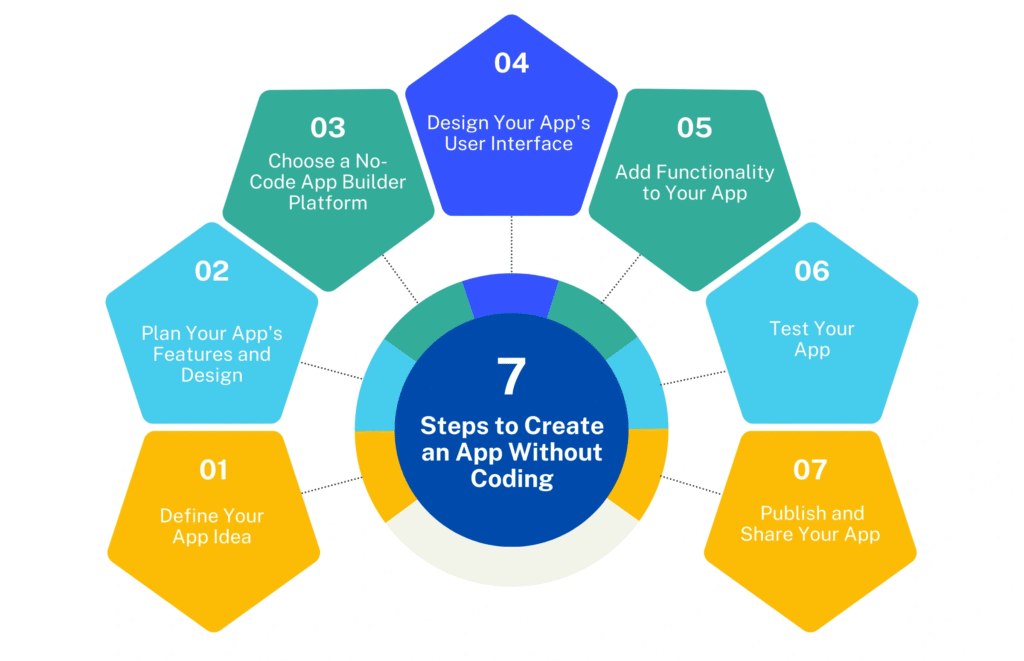
Your Step-by-Step Blueprint to Building an App Without Code
Knowing the tools is one thing; knowing how to use them is another. Let’s walk through the proven, step-by-step process for taking your app from a spark of an idea to a live product in the app stores.
Step 1: Validate Your App Idea (Before You Build a Thing)
This is the most critical and most often skipped step. You must ensure there is a real need for your app. Building something nobody wants is the biggest waste of time and resources, even with no-code.
- Define the Core Problem: What specific pain point does your app solve? Be ruthlessly specific. “Helping people get fit” is vague. “Providing busy professionals with 15-minute, equipment-free home workouts” is specific.
- Identify Your Target Audience: Who exactly are you building for? Create a simple user persona. For example, “Busy Brian, a 35-year-old marketing manager with two kids who struggles to find time for the gym.”
- Conduct Market Research: Are there existing solutions? What do they do well? Where do they fall short? This isn’t to discourage you, but to help you find your unique angle.
- Talk to Potential Users: This is non-negotiable. Find 5-10 people who fit your target audience and interview them. Ask about their frustrations, their current solutions, and whether your proposed app idea would be something they’d use and potentially pay for.
Step 2: Map Out Your App’s Structure and User Flow
Before you even open a no-code tool, plan your app on paper or using a tool like Figma, Miro, or even a whiteboard. This is your app’s blueprint.
- List All Necessary Screens: Login, Sign Up, Home Feed, User Profile, Settings, Product Detail, etc.
- Sketch the User Journey: Map out how a user will move through your app to complete key actions. For example, the “Onboarding Journey”: Splash Screen -> Login/Sign Up -> Set Preferences -> Home Screen.
- Define the Data You Need: What information needs to be stored? For a user profile, it might be: Name, Email, Profile Picture, Bio. This will directly inform your database structure later.
Step 3: Design the User Interface (UI) and User Experience (UX)
Now, you move into your chosen no-code platform and start building. Start by creating the visual shell of your app.
- Leverage Templates, Then Customize: Most platforms offer templates. Use one that’s close to your vision as a starting point to save time, but don’t be afraid to heavily customize it to match your brand.
- Prioritize Simplicity and Clarity: A cluttered interface will drive users away. Use plenty of white space, clear typography, and intuitive icons. Every screen should have one primary action you want the user to take.
- Maintain Consistency: Use the same fonts, button styles, and color schemes throughout your entire app. This creates a professional, cohesive feel.
Step 4: Connect the Logic with Visual Workflows
This is where the magic happens—you make your app do things. This is done through visual workflows that follow an “If This, Then That” logic.
- Example Workflow in Adalo/Bubble: “When the ‘Submit’ button is clicked, Create a new ‘Contact Request’ in the database, Then show an alert that says ‘Message Sent!’, Then navigate back to the Home Screen.”
- Key Actions to Master:
- Navigation: Moving users between screens.
- Data Creation/Editing: Saving user input to your database.
- Data Display: Showing dynamic information from your database in lists, text, and images.
- Conditions: Creating “if” statements (e.g., If the user is an admin, show the ‘Edit’ button).
Step 5: Integrate Your Essential Features
No app is an island. You’ll need to connect it to external services to add critical functionality.
- Databases: Most platforms have a built-in database, but for more complex needs, you can connect to Airtable or Google Sheets via their APIs.
- Payments: To accept money, you’ll integrate Stripe. No-code platforms make this relatively simple with pre-built components or plugins that handle the secure transaction process.
- Authentication: For user sign-ups and logins, you can use the platform’s built-in system or connect to more powerful services like Auth0 or Firebase Authentication.
- Communications: To send emails or push notifications, connect to SendGrid, Mailchimp, or OneSignal.
Step 6: Test, Test, and Test Again
Never skip rigorous testing. A buggy app will destroy user trust.
- Test on Multiple Devices: Check your app on both iOS and Android phones and tablets.
- Enlist Beta Testers: Share a test version with friends, family, and your initial interviewees. Ask them to try to break it and report any confusing elements or bugs.
- Check All User Flows: Go through every single possible path a user could take—every button click, every form submission, every navigation link.
Step 7: Launch to the App Stores
Your no-code platform will provide detailed guides on how to publish to the Apple App Store and Google Play Store. This process involves:
- Creating Developer Accounts: You need a paid account with both Apple ($99/year) and Google ($25 one-time).
- Preparing Assets: App icons (in multiple sizes), screenshots, descriptions, and keywords.
- Submitting for Review: Both stores will review your app to ensure it meets their guidelines. This can take a few days for Google Play and up to a week for Apple’s App Store.
Step 8: Market Your App and Gather Feedback
Launching is just the beginning. Now you need users.
- Leverage Your Network: Announce your launch on social media, in relevant online communities, and to your email list.
- Collect User Feedback: Use in-app feedback tools or simply encourage users to email you. Listen carefully to their suggestions and complaints.
- Iterate and Improve: Your app is never “finished.” Use the analytics and feedback to create a roadmap for version 1.1, 1.2, and beyond. The agility of no-code means you can push updates quickly and constantly improve.
Frequently Asked Questions (FAQ)
1. Is it really possible to build a professional, scalable app without code?
Absolutely. The capabilities of modern no-code platforms are extensive. Companies like Comet (a freelance marketplace) and Qoins (a financial app) started on no-code platforms and scaled to handle millions of dollars in transactions and thousands of users. The key is choosing the right platform (like Bubble for complex web apps) for your scalability needs from the start.
2. What are the limitations of no-code app development?
While powerful, no-code has boundaries. The primary limitation is customization. If you need a highly unique, algorithm-heavy feature (like a custom video processing filter or a complex machine learning model), you might hit a wall. However, many platforms now allow you to extend functionality by connecting to custom code via APIs, blurring this line significantly.
3. How much does it cost to build an app with a no-code platform?
Costs are dramatically lower. Expect to pay for the no-code platform subscription ($50 – $500/month), necessary third-party service subscriptions (e.g., Stripe, SendGrid), and the annual developer fees for the app stores (Apple: $99/year, Google: $25 one-time). Total initial costs can easily be under $1,000 for the first year, compared to tens of thousands for a coded app.
4. Can I get my app into the Apple App Store and Google Play Store?
Yes, all the major no-code platforms provide the tools and guidance to compile your project into a format that meets the store guidelines and can be submitted for review. They handle the technical packaging; you handle the account setup and submission process.
5. What is the difference between a native app and a progressive web app (PWA)?
A native app is downloaded from an app store (like Instagram) and has deep integration with the phone’s OS. A PWA is a website that looks and feels like an app—it can be “installed” on your home screen but runs in a browser. No-code tools like Glide often produce PWAs, while Adalo and others can produce true native apps. PWAs are faster to build and update, while native apps can feel smoother and have more device access.
6. Which no-code platform is the easiest for a complete beginner?
For a pure beginner, Glide is arguably the easiest because it builds directly off the familiar concept of a spreadsheet. Adalo is also very intuitive for mobile app design, though it has a slightly steeper learning curve than Glide.
7. Can I build a social media app without code?
Yes, you can build a community or social network with features like user profiles, feeds, posting, liking, and commenting. Platforms like Adalo and Bubble are perfectly suited for this. However, moderating content and scaling to millions of concurrent users presents its own set of advanced challenges.
8. How do I handle data and user privacy with a no-code app?
This is a critical consideration. You must create a Privacy Policy that explains what data you collect and how you use it. Reputable no-code platforms are compliant with regulations like GDPR and CCPA, but the responsibility for your users’ data ultimately falls on you. Always be transparent and use secure connections (HTTPS).
9. Can I integrate features like maps, payments, and calendars?
Yes, this is a major strength of no-code. Most platforms have pre-built integrations or plugins for services like Google Maps, Stripe for payments, and Google Calendar. These can typically be added with a few clicks and some configuration.
10. If my no-code app becomes hugely successful, can I ever transition to code?
Yes, this is a common path known as “rewriting.” Once you have a validated product and traction, you can hire a development team to rebuild your app from the ground up with custom code. Your no-code app acts as the perfect, functional prototype and blueprint, de-risking the development process significantly. You already know exactly what to build because you’ve already built it.
Conclusion: Your App Idea Is No Longer Out of Reach
The barriers that once stood between you and your mobile app dream have been dismantled. The tools are here, the process is proven, and a global community of no-code builders is ready to support you. The journey from idea to app store is no longer a multi-year, multi-hundred-thousand-dollar odyssey. It is a structured, creative, and deeply rewarding project that you can start today.
The most important step is the first one. Don’t get paralyzed by trying to choose the perfect platform or design the perfect icon. Start with Step 1: validate your idea. Talk to one potential user. Sketch one screen. The momentum you build from taking that initial action will carry you through the entire process. Your app idea is valid, it is needed, and now, you have the power to build it yourself.