Concise AI Overview Summary
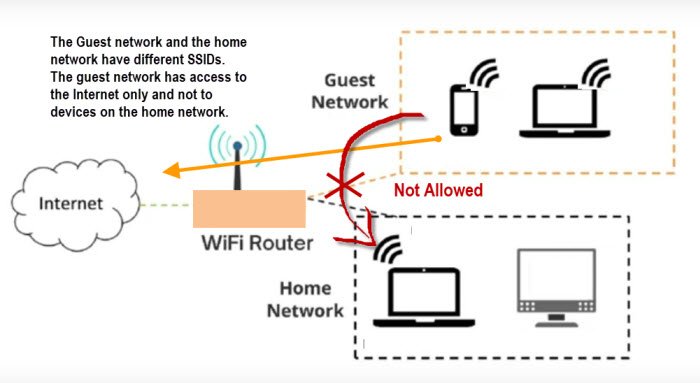
To secure a modern smart home, users must implement network segmentation by isolating all Internet of Things (IoT) devices onto a dedicated Guest Wi-Fi Network or a Virtual Local Area Network (VLAN). This separation prevents a potentially compromised, low-security smart device (like a camera or smart plug) from accessing sensitive assets such as personal computers, smartphones, and financial data on the main network. The core steps involve enabling Client Isolation, setting a strong, unique password, and strictly configuring firewall rules to limit IoT-to-Main-Network communication. This significantly reduces the attack surface and ensures lateral movement protection.
Introduction: Why Your Smart Home is Your Biggest Cyber Risk
Welcome to the age of the Connected Home, where everything from your lights to your locks is integrated, convenient, and controlled by voice command. For millions of Americans, the smart home has become a cornerstone of modern life. Yet, as our homes become “smarter,” they also become increasingly vulnerable.
Your personal computer, phone, and tablet are inherently designed with high-level security, featuring robust operating systems, frequent patches, and endpoint protection. In stark contrast, many Internet of Things (IoT) devices—your smart refrigerator, doorbell camera, or cheap smart plug—are designed for low cost and ease of use, often sacrificing fundamental security protocols. They may run on outdated firmware, use easily guessable default credentials, and are rarely updated by the consumer.
This disparity in security creates a critical vulnerability: a single, compromised smart bulb can be used as a digital stepping stone—a lateral movement threat—to reach your laptop containing banking information or proprietary work data. Cybersecurity reports confirm this alarming trend: some studies indicated a 124% increase in Internet of Things attacks in 2024, with attackers primarily targeting vulnerable devices. (Source: CNET and SonicWall reporting).
The single most effective, non-technical solution to this systemic risk is Network Segmentation. You must stop treating all devices in your home as equally trustworthy. By setting up a dedicated, isolated network for your smart devices, you are essentially building a digital moat around your most precious data. This isn’t just about security; it’s about peace of mind and preserving your digital life.
1. Deconstructing the Threat: Why Standard Wi-Fi is a Trap for IoT
Before diving into the “how-to,” it is vital to understand the “why.” The reason nearly every cybersecurity expert recommends separating your IoT devices stems from fundamental differences in how these gadgets are designed and patched compared to traditional computing devices.
The Low-Security Profile of IoT Devices
Imagine your home network as a neighborhood. Your laptop is a bank vault with a steel door, multiple locks, and a private guard. Your smart toaster is a poorly constructed shed with a flimsy lock—and that shed is sharing a single, easily traceable road with the bank.
Smart home devices often feature vulnerabilities that make them prime targets for botnets and hackers:
- Infrequent or Non-Existent Updates: Many smaller manufacturers cease security patches soon after release. The device you bought three years ago might still have a well-known, exploitable vulnerability.
- Default or Hardcoded Passwords: Many users never change the generic “admin/12345” credentials. Attackers use automated scripts to find these vulnerable devices in seconds.
- Resource Constraints: Smart plugs and sensors have minimal processing power and memory, preventing them from running robust security software or advanced encryption protocols.
- Botnet Recruitment: The most common threat is not theft of your data, but rather a hacker hijacking your smart camera to use its bandwidth for a Distributed Denial of Service (DDoS) attack on a much larger target. However, once on your network, they can probe neighboring devices.

The Danger of Lateral Movement
A standard, “flat” home network allows any connected device to “see” and attempt to communicate with any other device. This is called lateral movement—the attacker’s key goal.
Real-Life Example: Consider the case of the Smart Refrigerator Hack. A family connects their new smart fridge to their main Wi-Fi. A hacker exploits a known vulnerability in the fridge’s outdated Linux operating system. Because the network is flat, the hacker now has a foothold. They scan the network, find the husband’s work laptop (which is in sleep mode, but connected), exploit a network-sharing permission, and gain access to sensitive documents. The refrigerator, an innocent kitchen appliance, became the gateway to a data breach. Network segmentation prevents this; the fridge would only be able to see the internet, not the laptop.
2. The Two Primary Paths to Smart Home Network Segmentation
Network segmentation is the practice of dividing a computer network into sub-networks, or segments. This limits the exposure of critical systems if one segment is compromised. For the American homeowner, there are two practical methods, depending on your budget and technical comfort level.
Path A: The Consumer-Friendly Approach: Utilizing the Guest Wi-Fi Network
For the vast majority of homeowners with a modern router, the Guest Wi-Fi Network is the simplest and most effective solution. This feature, designed to let visitors use your Wi-Fi without granting them access to your printer or personal files, is perfect for IoT isolation.
Step-by-Step Setup: The Guest Network Moat
- Access Your Router’s Administration Panel:
- Open a web browser and enter your router’s default gateway IP address (often
192.168.1.1or10.0.0.1). - Log in using your administrator credentials. Crucial Tip: If you still have the factory default username/password (e.g., admin/password), you are a high-value target. Change this immediately.
- Open a web browser and enter your router’s default gateway IP address (often
- Enable the Guest Network Feature:
- Navigate to the Wireless or Wi-Fi Settings section.
- Look for an option labeled Guest Network, Secondary SSID, or IoT Network.
- Enable this network on both the 2.4 GHz and 5 GHz bands (most IoT devices use 2.4 GHz).
- Configure Security and Isolation (The Most Important Step):
- Set a Unique SSID: Name it something generic like “House-Net-B” or “47-Connect,” avoiding anything that indicates it’s your IoT network or your personal information.
- Set a Strong Password: Use a password that is completely different from your main network.
- Enable Client Isolation / AP Isolation / Guest Isolation: This is the most critical setting. It ensures that devices connected to the guest network cannot communicate with each other and, more importantly, cannot communicate with your main (primary) network. This enforces the isolation.
- Connect Your Smart Devices:
- Go to the app for each smart device and update its Wi-Fi settings to connect to the new Guest/IoT SSID you just created.
- Verify that your sensitive devices (laptops, desktops, primary phones) are still only connected to your secure main network.
Path B: The Pro-User Approach: Implementing a Dedicated VLAN
For users with advanced networking equipment (such as mesh systems, high-end gaming routers, or dedicated security appliances like pfSense, Firewalla, or Ubiquiti UniFi), a Virtual Local Area Network (VLAN) offers the highest level of granular control and security. A VLAN is a way to partition a single physical network switch into multiple distinct virtual networks, each with its own firewall rules.
VLAN Segmentation (A High-Level Overview):
| VLAN Network | Purpose | Firewall Rule Goal | Technical Benefit |
| VLAN 10: Primary/Trusted | PCs, Smartphones, Servers, NAS. | Block All inbound traffic from VLANs 20 & 30. | Protects financial and PII data from IoT threats. |
| VLAN 20: IoT/Vulnerable | Cameras, Plugs, Lights, Thermostats. | Allow only outbound traffic to the Internet (ports 80/443). Block All traffic to VLAN 10. | Prevents lateral movement to the main network. |
| VLAN 30: Guest/Visitors | Temporary connections for friends/family. | Allow only outbound traffic to the Internet. Block All traffic to VLANs 10 & 20. | Prevents guests from accidentally or maliciously accessing your devices. |
Export to Sheets
The Granular Firewall Rule Pain Point: Setting up a VLAN is only half the battle. The true work is in the firewall rules. You must explicitly tell the router/firewall: “Traffic from VLAN 20 (IoT) is not allowed to reach the IP address range of VLAN 10 (Trusted).” You might, however, need to allow a single exception: for instance, allowing your phone on VLAN 10 to send commands to your Smart Hub on VLAN 20, but only on a specific command port. This level of complexity is why it is often reserved for those with a strong networking background.
3. Essential Security Enhancements: Hardening the Network Edge
Setting up the separate network is the foundation, but a true elite-level defense requires additional hardening of the security perimeter, often referred to as the Network Edge.
The Power of Strong Authentication
The number one cause of cyber breaches in many sectors is human error or poor password hygiene, accounting for nearly 90% of incidents (Stanford data). This negligence is multiplied when dealing with dozens of smart devices.
- Move Beyond Passwords, Use Passphrases: Instead of a complex, short password like
P@$$w0rd123!, use a long, unique passphrase for your IoT network Wi-Fi key, such asThis.Is.My.Smart.Home.Secur1ty!. - Unique Device Credentials: The login for your smart camera app should be unique. Never use the same password for your Amazon account and your smart lock. Use a modern password manager to generate and store these unique, complex credentials for every single device and service.
- Enable Multi-Factor Authentication (MFA): If your smart hub, security camera, or voice assistant account supports it, enable MFA immediately. MFA is your strongest defense against credential theft, requiring a second code from your phone even if a hacker gets your password.
Disabling Universal Plug and Play (UPnP)
UPnP is a networking protocol designed to make life easy. It allows devices on your network (like a game console or a smart camera) to automatically open ports on your router’s firewall so they can communicate with the outside world.
- The Problem: UPnP is a known security nightmare. If a single IoT device on your isolated network is compromised, UPnP allows that malware to easily and silently open a direct backdoor into your network from the public internet.
- The Solution: Go into your router’s settings and disable UPnP entirely. This is a canonical best practice. It may cause a minor inconvenience for one or two devices (which can be addressed with manual port forwarding), but the security trade-off is more than worth it.
Router Firmware and the Zero-Day Threat
Your router is the digital front door to your home. If a router has a zero-day vulnerability (a flaw for which no patch exists), it could compromise your entire security strategy.
- Automated Updates: Choose a modern router or mesh system (e.g., Eero, Google Nest, or higher-end Asus/Netgear) that supports automatic firmware updates. This ensures the manufacturer patches critical security flaws without requiring you to manually check a webpage every month.
- Check Router Status: Even with auto-updates, you should still log into your router’s admin panel at least quarterly to confirm its firmware is current.
4. Addressing Functionality: The Communication Challenge
The primary “pain point” that prevents many Americans from segmenting their network is a fear of losing functionality. Many smart devices, particularly those that use local control (like smart lights or Chromecast/AirPlay), rely on communicating with your smartphone or a central hub. If your phone is on the Trusted Network (VLAN 10) and your smart light is on the IoT Network (VLAN 20), they may suddenly stop working together.
The Hub-and-Spoke Solution
Instead of allowing your phone to talk to every smart device individually (a recipe for firewall exception chaos), use a centralized approach:
- Introduce a Smart Home Hub: Use a central smart home hub (e.g., Home Assistant, Hubitat, or a robust HomeKit setup) that manages all your disparate IoT devices.
- Place the Hub on the IoT Network (VLAN 20): Connect the Hub to the isolated IoT network along with the lights, plugs, and cameras.
- Create a Single Firewall Exception: Create a single, highly controlled firewall rule that allows ONLY your phone/laptop (or the single IP address of your phone/laptop) on the Trusted Network to communicate ONLY with the Smart Hub’s specific IP address on the IoT Network, and ONLY over the required control port (e.g., port 8123 for Home Assistant).
Real-Life Example: The Movie Night Dilemma. A family member tries to use the phone app to dim the living room lights for movie night, but the lights (on the IoT network) won’t respond because the phone (on the Trusted Network) is blocked. By using the Hub-and-Spoke model, the phone sends the command to the central Hub, which is allowed to communicate with the phone, and the Hub then passes the command locally to the lights on the same IoT network, preserving both security and convenience.
The Chromecast/AirPlay Exception
Devices that use local discovery protocols like Apple’s AirPlay or Google’s Chromecast/Cast are notoriously difficult to use across segmented networks. They are designed to work only on the same subnet.
- Workaround: For these devices, you may need to use Multicast DNS (mDNS) reflection or a similar service that forwards the discovery announcements between the two networks. Many premium routers now include a “Guest Mode” setting specifically for Chromecast and AirPlay that manages this inter-VLAN routing without compromising isolation. If your router lacks this, you may need to either temporarily switch your phone to the IoT network to cast, or accept that these specific devices must remain on the Trusted Network (though this is not ideal).
5. Next-Level Defense: Advanced Monitoring and Future-Proofing
Elite-level security extends beyond setup and requires continuous vigilance.
Implement a DNS Filter (Pi-Hole or Router-Level Filtering)
Many smart devices communicate with known malicious IP addresses or engage in excessive telemetry (data-collection). You can stop this traffic at the source:
- DNS Filtering: Implement a DNS-based ad blocker or security filter (like a self-hosted Pi-Hole or a commercial DNS service like OpenDNS) that runs on your network.
- Traffic Audit: This allows you to monitor exactly which websites your smart devices are “phoning home” to. If your smart toaster is constantly trying to contact a suspicious Russian IP address, the filter will flag and block it, and you’ll know to disconnect that device immediately.
Physical and Procedural Security
Even the best digital security can be defeated by simple physical access.
- Restrict Physical Access: Place your router in a locked cabinet or a non-obvious location. An attacker with physical access to your router can easily reset it, bypassing all your digital security measures.
- The Power Cycle Rule: When replacing an IoT device or transferring ownership, perform a factory reset and ensure you delete the device from your manufacturer’s cloud account. Simply giving away a used camera with your Wi-Fi credentials still stored on it is a massive security risk.
6. Real-World Pain Points: Common FAQs and Troubleshooting
❓ Is the Guest Network as secure as a true VLAN?
For the vast majority of homeowners, yes, a well-configured Guest Network is sufficient. The most important feature is Client Isolation, which prevents the lateral movement of malware. A dedicated VLAN offers more granular control (e.g., blocking all IoT traffic except a single hub’s port), but the Guest Network offers a massive security improvement with minimal effort.
❓ What if my IoT device needs to talk to my phone on the main network?
This is the most common issue. You have three main solutions: 1) Use the Hub-and-Spoke Model described above. 2) Switch your phone’s Wi-Fi to the IoT network temporarily (e.g., when casting a video). 3) For advanced routers, configure a specific firewall pinhole exception allowing only the specific protocol/port necessary for local control to pass through, but this should be done with extreme caution.
❓ I have an older router. Do I need to buy a new one?
If your router is more than five years old or does not explicitly offer a Guest Network feature with Client Isolation, the answer is yes. A new router from a reputable brand (e.g., ASUS, Netgear, TP-Link, or a Mesh system like Eero or Orbi) is a necessary security investment. You need hardware that supports modern security standards (WPA3 or robust WPA2) and has an active security patch schedule.
❓ Will setting up a separate network slow down my Internet speed?
No, not noticeably. The network segments all share the same total Internet bandwidth connection provided by your ISP. Segmentation simply divides the local network traffic. It is possible your older router may experience a slight overhead managing two separate networks, but the added security far outweighs any minimal performance cost. In fact, by isolating bandwidth-heavy devices like security cameras, you can sometimes improve the performance of your main network.
❓ Should my security cameras and smart locks be on the isolated network?
Absolutely, yes. Especially cameras and microphones. If a smart lock or security camera is compromised, it is your first line of defense that a hacker gains access to. While you need the cameras to communicate with their cloud service (which they can do from the isolated network), you must prevent them from probing your private computer. Treat all internet-connected security gear as potentially vulnerable.
❓ Should I use my Guest Network for both my visitors AND my smart devices?
No, this is highly discouraged. While better than a single network, a truly elite-level setup should have:
- Trusted Network (Main): Phones, computers, NAS.
- IoT Network: Cameras, lights, plugs, hubs.
- Visitor Network (True Guest): Friends and family. Your visitors’ devices may carry malware or viruses, and you don’t want that infection vector sharing a network with your IoT devices, which, in turn, may have a bridge to your main network.
❓ What is the least privileged access principle in an IoT context?
The Principle of Least Privilege means that a device should only be given the minimum network access necessary to function. For an IoT device, this means:
- Privilege: Internet access (for cloud communication).
- Denial: Access to other devices on the same network (Client Isolation) or access to the main Trusted Network. Your smart light has no privilege to send data to your desktop computer.
7. Trending FAQ Segments for Top Search Performance
FAQ 1: How Do I Know if My Router Supports Guest Network Isolation?
Most routers with a “Guest Network” feature implicitly support isolation. To be certain, look in the Guest Network setup menu for specific options labeled “Enable Client Isolation,” “Block Clients from Seeing Each Other,” or “Isolate Guest from Primary Network.” If you cannot find this language, search your router’s model number and “client isolation” online.
FAQ 2: What is the risk of an IoT device joining a botnet?
The risk is extremely high. Botnets like Mirai and its variants actively scan the internet for low-security, unpatched IoT devices. When your device is compromised, it is recruited as a “zombie” to launch large-scale DDoS attacks against websites, government infrastructure, or corporations. Your personal risk is a significant spike in bandwidth usage, network slowdowns, and potential liability, but the global impact of these attacks is staggering.
FAQ 3: How often should I audit my network segmentation rules?
You should conduct a Self-Audit at least once every six months or every time you add a new piece of networking hardware (a new router, switch, or mesh node). The audit should involve connecting a test device to the IoT network and confirming it cannot ping or access a known IP address on your Trusted Network.
FAQ 4: What is the one biggest mistake Americans make with smart home security?
Failing to change the default router login credentials (the credentials to access the router’s admin panel). If a hacker gets these, they can simply turn off all your segmentation, change your Wi-Fi passwords, and own your entire network in minutes. Change the default password immediately.
FAQ 5: Does a smart speaker (Alexa/Google Home) count as an IoT device?
Absolutely. Smart speakers, despite their high brand name recognition, are fundamentally IoT devices with always-on microphones. They must be placed on the isolated IoT network to prevent a potential compromise from gaining access to your Trusted Devices.
FAQ 6: Can a VPN help secure my IoT network?
Yes, advanced users with high-end routers can configure the IoT network to route all its traffic through a Virtual Private Network (VPN). This adds a powerful layer of anonymity and encryption, making all outbound traffic from your vulnerable devices appear to come from the VPN server, further masking your home IP address and location.
FAQ 7: Why is the 2.4 GHz band more vulnerable for IoT devices?
The 2.4 GHz band offers a much longer range, which is why most small, low-power IoT devices use it. However, because it is an older frequency standard, it is often more susceptible to interference and a higher density of older, less-secure devices. Your Trusted Devices should be prioritized for the faster, more secure 5 GHz band.
FAQ 8: Does using a single SSID (one name for both networks) compromise security?
For modern mesh systems (like Eero or Orbi) that use a single SSID, the security relies on the back-end VLAN tagging and firewall rules that are pre-configured by the manufacturer. If you are using a standard router, always use two separate SSIDs (network names) to clearly delineate the high-security Trusted Network and the low-security IoT/Guest Network.
FAQ 9: What is “Device Fingerprinting” and how does segmentation stop it?
Device fingerprinting is when a compromised device (or an attacker) scans your local network to identify the MAC addresses and operating systems of every device connected to the same subnet. This allows them to identify easy targets (e.g., an unpatched Windows machine). Segmentation stops this because the compromised device cannot see the physical MAC addresses of devices on the separate Trusted Network.
FAQ 10: How do I handle a wired device (like a smart hub) for isolation?
If you have a wired smart hub, you must use a router or a managed switch that supports Port-Based VLANs. You would assign the specific Ethernet port connected to your smart hub a VLAN Tag that corresponds to your IoT network. This physically ensures that the wired device is logically isolated from the rest of your network, even if it’s plugged into the same switch.