Summary
Email accounts are prime targets for hackers, risking personal data, financial information, and online identity. This guide helps U.S. users detect signs of hacking and take immediate action to secure their accounts. From unusual activity to unauthorized logins, password management, and recovery steps, it provides actionable strategies to protect sensitive information and prevent further breaches.
Introduction: Why Email Security Matters
Email is often the gateway to everything online—bank accounts, social media, work documents, and personal communications. A compromised account can lead to identity theft, financial loss, or phishing attacks.
Example:
A small business owner noticed unfamiliar sent emails and password change notifications. Acting quickly to secure the account prevented sensitive client data from being accessed by attackers.
Understanding the signs and knowing the right steps is essential to regain control and secure your digital life.
Common Signs Your Email Account Has Been Hacked
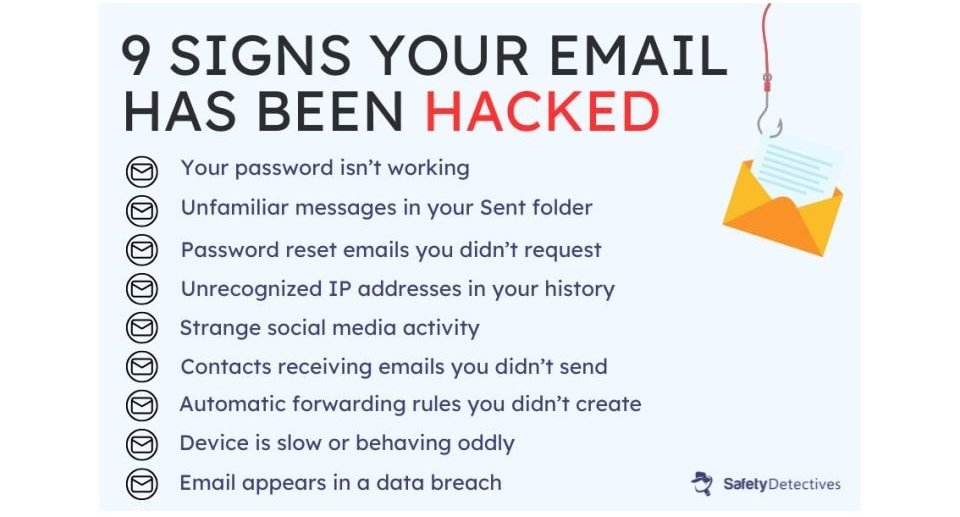
1. Unusual Login Activity
- Notifications about logins from unfamiliar locations or devices
- Login alerts at odd hours
- Emails reporting password changes you didn’t make
Example:
A user received a login alert from a foreign country despite never leaving the U.S., indicating unauthorized access.
2. Unknown Emails Sent From Your Account
- Friends or colleagues report receiving suspicious emails from you
- Spam or phishing messages appear in your “Sent” folder
Example:
A college student’s contacts reported receiving emails requesting gift card payments—these were sent by hackers using the compromised account.

3. Password or Security Settings Changed
- Unexpected changes in recovery email, phone number, or password
- Difficulty logging in despite using the correct credentials
Example:
An employee couldn’t access their work email because hackers changed the recovery phone number, locking them out temporarily.
4. Unusual Email Behavior or Pop-Ups
- Missing emails, unexpected auto-forwards, or strange pop-ups
- Email signature altered without your knowledge
Example:
A freelance writer noticed emails were being auto-forwarded to an unknown address, indicating unauthorized rule changes.
5. Login Alerts from Suspicious Apps
- Third-party apps connected to your email that you didn’t authorize
- Unexplained access to cloud storage or calendar linked to email
Example:
A user found a suspicious task management app had access to their Gmail account, highlighting a potential hack.
Immediate Steps to Secure a Hacked Email Account
Step 1: Change Your Password
- Use a strong, unique password with letters, numbers, and symbols
- Avoid previously used passwords
- Enable two-factor authentication (2FA)
Step 2: Check Recovery Options
- Verify your recovery email and phone number
- Remove unauthorized addresses or numbers
Step 3: Review Account Activity
- Check “Recent Activity” or “Security” tab
- Log out of all devices you don’t recognize
Step 4: Scan for Malware
- Run antivirus and malware scans on all devices
- Ensure your device is clean before changing passwords
Step 5: Notify Contacts
- Inform contacts not to click on suspicious links sent from your account
- Warn them about potential phishing attempts
Step 6: Update Other Accounts
- If you used the same password elsewhere, update those accounts immediately
- Review bank accounts, social media, and cloud storage linked to the email
Long-Term Prevention Tips
Pointers:
- Enable two-factor authentication for added security
- Use a password manager to generate unique passwords
- Avoid using public Wi-Fi without VPN
- Regularly review account activity and permissions
- Stay vigilant against phishing emails and suspicious links
Example:
A user who enabled 2FA and updated passwords monthly noticed no suspicious activity for over a year, preventing potential hacks.
FAQs: Email Account Hacked
1. How can I tell if my email has been hacked?
Signs include unfamiliar login locations, sudden password changes, missing or auto-forwarded emails, unusual sent messages, and alerts from third-party apps you didn’t authorize. Checking account activity and monitoring your contacts’ reports of suspicious emails helps confirm unauthorized access. Immediate action is required to secure the account.
2. What should I do if I can’t log into my hacked email?
If locked out, use the account recovery option provided by your email provider. Verify your identity with recovery email, phone number, or security questions. Contact customer support if necessary. Once regained, immediately change the password, enable 2FA, and review recent activity for suspicious changes.
3. Can hackers access my other accounts through my email?
Yes. Many online services use email for password resets. If your email is compromised, hackers can attempt to access banking, social media, or cloud accounts. Change passwords on all linked accounts, enable 2FA, and review recent logins to prevent further breaches.
4. How long does it take to recover a hacked email?
Recovery time varies. Simple password resets may take minutes, while verifying identity for locked accounts can take hours to days, depending on the provider. Acting quickly, using recovery options, and contacting support accelerates the process and minimizes damage from unauthorized activity.
5. Does enabling two-factor authentication (2FA) prevent hacking?
2FA significantly improves security by requiring a second verification step, such as a code sent via SMS or an authenticator app. While not 100% foolproof, it makes unauthorized access far more difficult, reducing the risk of hackers compromising your email even if your password is stolen.
6. Should I notify my contacts if my email was hacked?
Yes. Inform your contacts not to click on suspicious links or attachments sent from your account. This prevents phishing spread and protects your friends, colleagues, or clients. Transparency also helps maintain trust and mitigates potential financial or data risks caused by the hack.
7. Can malware on my device lead to email hacking?
Absolutely. Malware, keyloggers, or spyware can capture login credentials and allow hackers to access your email. Running antivirus scans, keeping software updated, and avoiding suspicious downloads helps prevent unauthorized access and protects both your email and other sensitive accounts.
8. What are the most common ways hackers gain access to email accounts?
Common methods include phishing emails, password reuse, malware infections, weak passwords, and unsecured public Wi-Fi. Being cautious about links, using strong, unique passwords, enabling 2FA, and regularly updating software reduces the risk of compromise.
9. Can I recover emails deleted by a hacker?
Most email providers keep deleted emails in the Trash or Recycle folder for 30 days. Check these folders immediately. Some services allow support requests to recover permanently deleted messages. Acting quickly increases the likelihood of retrieving important emails before they’re permanently removed.
10. How do I prevent my email from being hacked in the future?
Use strong, unique passwords, enable 2FA, review login activity regularly, and avoid suspicious emails or attachments. Keep devices updated and secure, and avoid public Wi-Fi without a VPN. Regularly monitoring your account and practicing good digital hygiene is key to long-term email security.
Practical Takeaways
- Enable two-factor authentication and strong, unique passwords
- Monitor account activity regularly
- Avoid suspicious emails and links
- Scan devices for malware frequently
- Update recovery options and alert contacts promptly if compromised
Read This also : https://lightsalmon-butterfly-388873.hostingersite.com/navigating-emerging-trends-and-future-proof-investments-in-the-u-s-economy/