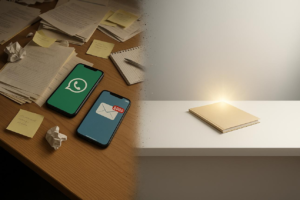
Simplifying your digital life doesn’t require drastic changes or new devices. With thoughtful adjustments—like reducing app clutter, managing notifications, improving file organization, and setting healthier screen habits—you can regain focus, save time, and reduce stress. This guide offers practical, real-world strategies that help Americans streamline everyday tech use while maintaining productivity, privacy, and control.
Why Digital Life Feels Overwhelming
For many Americans, digital overload isn’t caused by one device—it’s the accumulation of small inefficiencies across phones, laptops, apps, and online services. A 2023 report from the American Psychological Association noted that constant connectivity contributes to increased stress and reduced focus for a significant portion of adults.
The issue isn’t technology itself. It’s unmanaged complexity.
Between dozens of apps, constant notifications, fragmented file storage, and overlapping subscriptions, everyday tech use becomes reactive rather than intentional. The goal of simplification is not to use less technology—but to use it more deliberately.
Start With a Digital Reset (Without Losing Important Data)
Before making improvements, it helps to assess your current setup. Most people underestimate how much unnecessary digital clutter they carry.
Begin with a structured reset:
- Review all apps on your phone and remove anything unused in the past 30–60 days
- Audit browser extensions and uninstall those you don’t actively rely on
- Delete duplicate files, especially in Downloads and Desktop folders
- Log out of accounts you no longer use
- Consolidate similar tools (e.g., multiple note-taking apps)
This initial cleanup creates clarity. In many cases, users report immediate improvements in device speed and mental load simply from reducing visual and functional clutter.

Manage Notifications Like a System, Not a Stream
Notifications are one of the biggest sources of digital fatigue. The average smartphone user receives dozens—sometimes hundreds—of alerts daily.
Instead of turning everything off or leaving everything on, create a structured system:
- Allow real-time notifications only for high-priority apps (calls, messages, calendar alerts)
- Batch less urgent notifications (news, social media, retail apps)
- Disable non-essential sounds and badges
- Use “Do Not Disturb” or Focus modes during work hours
On devices like the Apple iPhone or Samsung Galaxy S series, built-in Focus modes allow users to customize notification filters based on time or activity.
This approach doesn’t eliminate notifications—it restores control over when and how you receive them.
Create a Logical File Organization System
Disorganized files slow down work and increase frustration. A simple folder structure can significantly reduce time spent searching for documents.
A practical system often looks like this:
- Main categories (Work, Personal, Finance, Projects)
- Subfolders by year or project name
- Consistent naming conventions (e.g., “2026_Tax_Documents.pdf”)
Cloud services like Google Drive or Dropbox make it easier to maintain access across devices.
The key is consistency. Even a basic structure becomes powerful when applied consistently over time.
Reduce App Overlap and Tool Redundancy
Many users rely on multiple apps that perform similar functions—note-taking, task management, messaging—without realizing the inefficiency this creates.
For example, instead of splitting tasks across email, notes apps, and messaging platforms, consider consolidating into one primary system like Microsoft To Do or Notion.
Benefits of consolidation include:
- Fewer logins and passwords
- Reduced context switching
- Clearer workflow visibility
- Better long-term organization
Simplification doesn’t mean limiting capability—it means reducing fragmentation.

Use Automation for Repetitive Tasks
Automation is one of the most underused tools in everyday tech.
Small automations can eliminate repetitive actions:
- Automatically back up photos to cloud storage
- Schedule bill payments through banking apps
- Use email filters to sort incoming messages
- Set recurring reminders for routine tasks
Tools like IFTTT or Zapier allow users to connect apps and automate workflows without coding.
For example, you can automatically save email attachments to cloud storage or receive a daily summary of your calendar events.
Over time, these adjustments reduce decision fatigue and free up mental bandwidth.
Streamline Your Digital Subscriptions
Subscription creep is a common issue in the U.S., where households often pay for multiple streaming services, software tools, and memberships simultaneously.
Conduct a quarterly audit:
- Review bank or credit card statements for recurring charges
- Cancel services you haven’t used in the past month
- Consolidate overlapping services (e.g., multiple streaming platforms)
- Switch to annual plans where cost-effective
According to a 2024 consumer finance study, the average American underestimates their subscription spending by over 40%.
Simplifying subscriptions isn’t just about saving money—it reduces cognitive load by minimizing unnecessary choices.
Improve Your Digital Privacy Settings
Simplifying your digital life also means reducing unnecessary data exposure.
Start with a few foundational steps:
- Review privacy settings on social media accounts
- Limit app permissions (location, camera, contacts)
- Enable two-factor authentication where available
- Use a password manager to avoid reuse
Browsers like Mozilla Firefox and Brave offer enhanced privacy controls compared to default settings in many systems.
A more secure digital environment is inherently simpler—fewer risks, fewer disruptions, and greater peace of mind.

Set Boundaries for Healthier Screen Use
Digital simplification isn’t just about tools—it’s about habits.
Without clear boundaries, even the most optimized setup can lead to burnout.
Practical adjustments include:
- Designating screen-free times (e.g., during meals or before bed)
- Using grayscale mode to reduce screen appeal
- Tracking screen time weekly
- Keeping devices out of the bedroom
Studies from organizations like the National Sleep Foundation suggest that reducing screen exposure before bedtime improves sleep quality and cognitive performance.
The goal isn’t restriction—it’s intentional use.
Optimize Your Home Screen and Workspace
A cluttered interface creates constant low-level distraction.
Simplify your digital environment:
- Keep only essential apps on your home screen
- Use folders sparingly and logically
- Choose a clean, distraction-free wallpaper
- Remove widgets that don’t provide real value
On desktops, maintain a clean workspace by limiting visible files and using structured folders instead.
These small visual changes reduce friction and make everyday interactions more efficient.
Build a Weekly Digital Maintenance Routine
Simplification isn’t a one-time task—it’s an ongoing habit.
A 15–20 minute weekly routine can prevent digital clutter from returning:
- Clear downloads and temporary files
- Review notifications and app usage
- Update software and apps
- Back up important data
- Reassess upcoming digital tasks
This routine keeps systems efficient without requiring major overhauls.
Frequently Asked Questions
1. How do I start simplifying my digital life if I feel overwhelmed?
Begin with one area—such as notifications or apps—and make incremental changes. Avoid trying to fix everything at once.
2. Do I need to buy new devices to simplify my setup?
No. Most improvements come from better organization and settings, not new hardware.
3. How often should I declutter my digital devices?
A light weekly check and a deeper monthly review work well for most users.
4. What’s the easiest way to reduce distractions on my phone?
Customize notifications and remove non-essential apps from your home screen.
5. Are productivity apps necessary for simplification?
Not always. In many cases, reducing the number of tools is more effective than adding new ones.
6. How can I keep my files organized long-term?
Use consistent naming conventions and folder structures across all devices.
7. Is automation difficult to set up?
Many tools offer simple, no-code setups that take just a few minutes.
8. How do I manage multiple email accounts efficiently?
Use a unified inbox or forward emails into a primary account with filters.
9. Can simplifying tech use improve mental health?
Yes. Reducing digital clutter and interruptions can improve focus and reduce stress.
10. What’s the biggest mistake people make when trying to simplify tech?
Trying to overhaul everything at once instead of making gradual, sustainable changes.
A More Intentional Way to Use Technology
Simplifying your digital life isn’t about cutting back—it’s about aligning your tools with how you actually live and work. When systems are clear, notifications are controlled, and tools are purposeful, technology becomes supportive rather than distracting.
The most effective changes are often the smallest ones, applied consistently.
What to Remember Moving Forward
- Start small and focus on one area at a time
- Reduce clutter before adding new tools
- Use automation to eliminate repetitive tasks
- Keep notifications intentional and limited
- Maintain simple, consistent organization systems
- Review subscriptions and digital habits regularly
- Prioritize privacy and security as part of simplification
- Build routines that keep your setup efficient over time